Summary
The Cycling Popularity Map helps you discover the most frequented routes in a specific country. Unlike the Personal Heatmap, which only shows your own rides, this layer uses anonymised data from the entire Cyclers community.
Step-by-step instructions
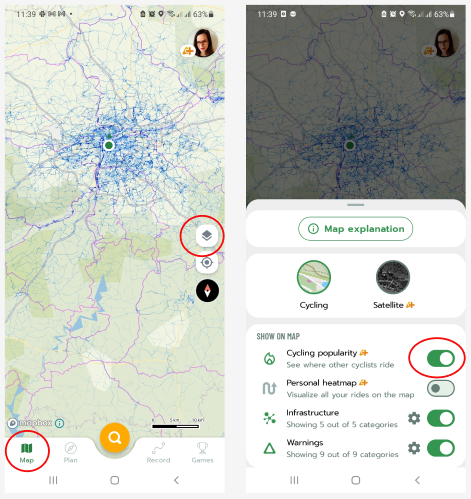
1. On the main map screen, tap the map layers icon (stacked squares) in the top right section.
2. From the menu, select Cycling popularity.
3. The map will then be overlaid with a colour-coded highlight of routes based on their popularity.
Supported countries
This feature is currently available for the following countries:
- Czechia
- Germany
- Poland
- France
- Slovakia
- United Kingdom
Difference between Popularity Map and Personal Heatmap
While both features are premium Cyclers Plus benefits, they serve different purposes:
- Popularity Map: Shows routes that are popular and frequently used by other cyclists in a specific country. Ideal for finding inspiration for new trips.
- Personal Heatmap: Displays exclusively your own recorded rides. It serves as your personal activity log.
Frequently Asked Questions (FAQ)
- Why can't I see the popularity map?
Ensure you have an active Plus subscription or trial and that you are viewing one of the supported countries. Try toggling the layer off and on again in the map settings.
Was this article helpful?
That’s Great!
Thank you for your feedback
Sorry! We couldn't be helpful
Thank you for your feedback
Feedback sent
We appreciate your effort and will try to fix the article