Summary
If the application leads you through impassable areas or unsuitable terrain, you can report the error directly from the route details, by long-pressing a location on the map, or by contacting us through the app.
Step-by-step instructions
Although we are constantly working to improve the planner, there may be situations where the suggested route passes through a fenced area or a path unsuitable for bicycles. These problems usually stem from inaccurate map data.
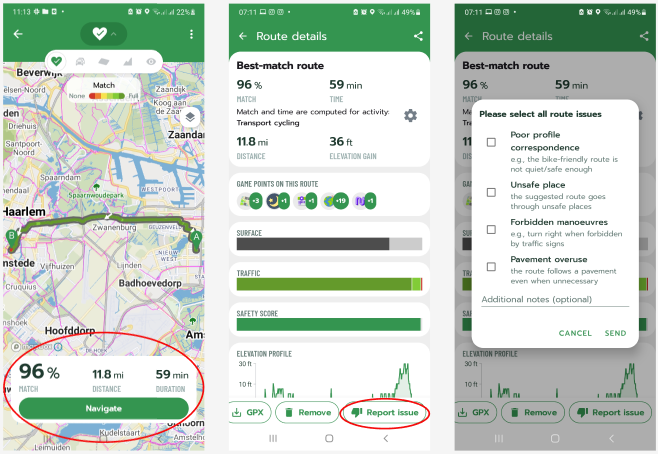
Option 1: Directly in the app (Android)
1. In the Planner section, open Route details.
2. Tap on Report issue.
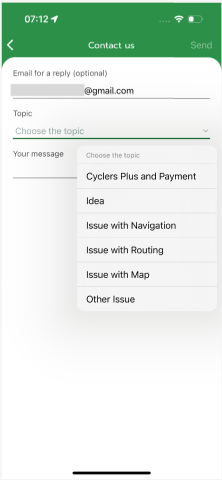
Option 2: Through the profile (Android & iOS)
1. Go to the My profile section.
2. Select Contact us.
3. Select the topic Issue with Navigation, Routing or Map.
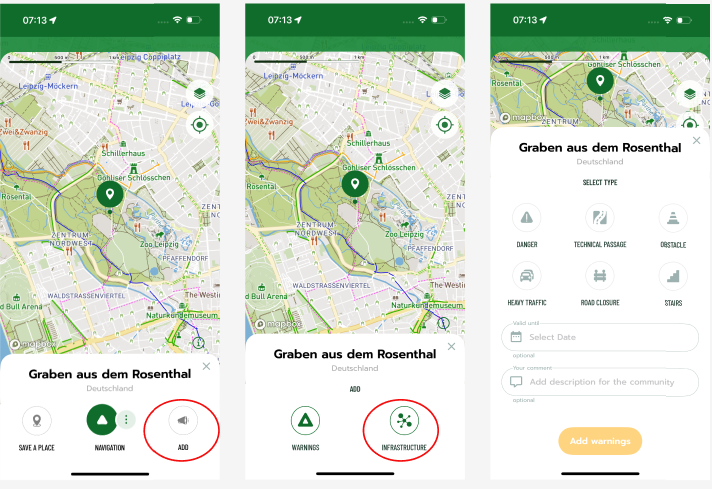
Option 3: Reporting a specific closure (Android & iOS)
1. On the Map, long-press your finger on the specific segment where the problem is.
2. Select Report and then Warning.
Frequently Asked Questions (FAQ)
- Should I also report differences in surface?
Yes, if the displayed surface, slope, or traffic density differs from reality, your feedback is very valuable.
Was this article helpful?
That’s Great!
Thank you for your feedback
Sorry! We couldn't be helpful
Thank you for your feedback
Feedback sent
We appreciate your effort and will try to fix the article