Summary
The Cyclers route planner suggests paths based on your Route preferences, which you can adjust for each individual ride directly in the activity settings.
Step-by-step instructions
1. On the route planning screen, tap the Customize button next to your selected activity.
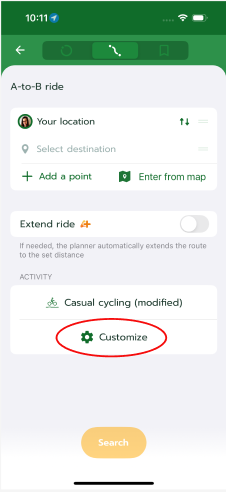
2. In the Route preferences section, locate the Surface option.
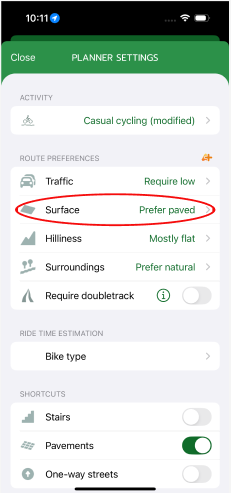
3. Choose the option that best matches your equipment and riding style:
- Require paved
- Prefer paved
- Neutral
- Prefer unpaved
- Single tracks
If the planned route does not match your set preferences and the real surface is different, please report it to us directly in the app.
Frequently Asked Questions (FAQ)
- What is the difference between "Require" and "Prefer" paved surfaces?
The "Require" option strictly searches only for asphalt and paved roads. The "Prefer" option prioritises high-quality surfaces but may suggest a short section on an unpaved path if no other cycle route is available.
- The app sent me to a forest path despite setting it to paved surface.
In this case, it is likely that the surface data in the map background does not match reality. Please use the route problem reporting feature.
Was this article helpful?
That’s Great!
Thank you for your feedback
Sorry! We couldn't be helpful
Thank you for your feedback
Feedback sent
We appreciate your effort and will try to fix the article