Summary
In the Android app, you can change units directly in the App settings, while on iOS, the units automatically adapt according to the system Region settings of your iPhone.
Step-by-step instructions
Android
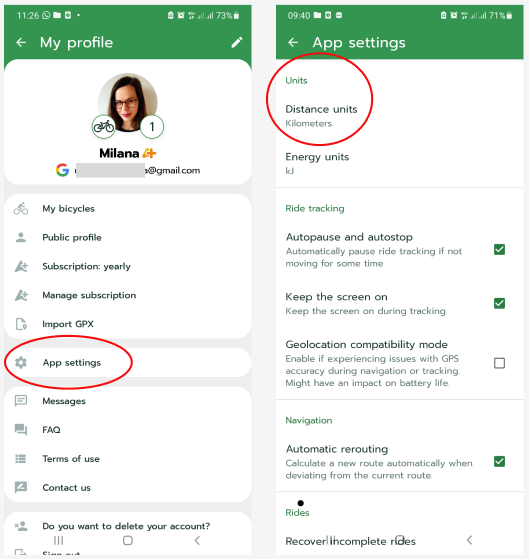
1. On the home screen with the map, tap your profile picture (in the top right corner).
2. Select the option App settings.
3. You will find Distance units right at the top of the screen.
4. Choose your desired units – kilometres or miles.
iOS
1. Open the Settings of your iPhone.
2. Go to the General section and select Language & Region.
3. Change the Region of your phone; the units in the Cyclers app will then automatically adapt to the standard of that country.
Detailed instructions can be found directly on Apple support pages.
Frequently Asked Questions (FAQ)
- I changed the region on my iPhone, but I still see the original units in the app.
Try completely closing and reopening the Cyclers app so that the new system settings are loaded.
- Do the energy units change along with the distance units?
Yes, in the Android settings, you can also adjust Energy units, for example to kJ or kcal, under the distance units.
- Why can't I change the units directly in the app on iOS?
The iOS system requires apps to respect the global region settings in the phone.
Was this article helpful?
That’s Great!
Thank you for your feedback
Sorry! We couldn't be helpful
Thank you for your feedback
Feedback sent
We appreciate your effort and will try to fix the article